Kitty Kaos
Made in Unity
7-person Team Project
6 Game Design Students
1 Music Scoring for Screen and Stage student
5 days long
March 4th-March 8th, 2024
Major Roles: Programming, Game Design
Game
Description
Kitty Kaos, is a 2D Microgame where you play as a cat trying to knock all the items off the shelf before the timer run outs. You must also avoid the getting caught in the red lights, as the cat will be unable to move for a couple seconds.
Audience
Kitty Kaos is playable on an arcade cabinet, and is accessible to the public outside of the Tim Horton’s location at Sheridan College’s Trafalgar campus. This means a general audience with not much time on their hands will be playing our game on arcade cabinet.
A one minute video going over our process in creating Kitty Kaos.
(Voiced by team member Abbas)
Design Challenge
This project was a challenge for the Sheridan Game Design students from years 1-3. Groups were randomly assigned to participate in a game jam-like challenge over the course of 5 days. For this design challenge, we also collaborated with the Music Scoring for Screen and Stage program who would contribute sounds and music for the Game Design students.
The challenge was to create a “microgame”, that can be played on an arcade cabinet. The game would be at most 30 seconds long, and input was restricted to one joystick and 2 buttons per player (max 2 players).
In this project I…
Programmed the main mechanics to make the game functional
Collaborated with other game designers to create a microgame
Collaborated with sound students to add sound and music into the game
Tested and received feedback which we then used to iterate on our game’s design
Updated the game to suitable for compliance testing
More on my process below
Research
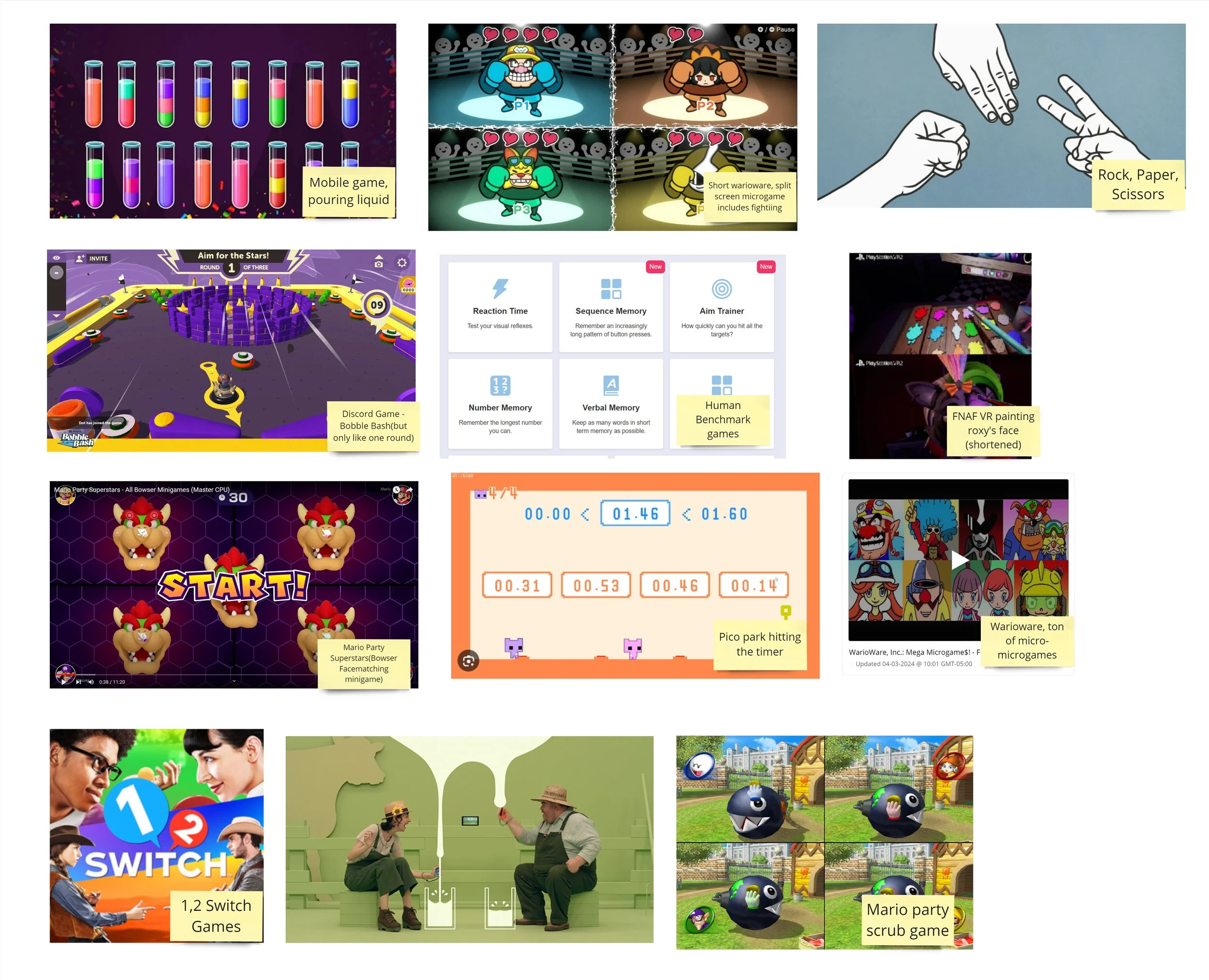
Our team gathered several examples of Microgames that we can reference and analyze.
We determined that most Microgames should have:
A focus on a singular verb (eg. Milking, pouring, painting, etc.)
A clear objective that can be understood almost immediately
A lot of juice to create a satisfying experience
Brainstorming
After our research, our team came up with three ideas and sketches for a microgame we would want to make and thought would work well as a microgame.
From left to right:
Bird poop game:
2D game where the player moves left and right as bird, pooping on passersby to score points
Cat knocking items over shelf:
A game where the player plays as a cat trying to knock over items
Cat cleaning game:
A game where the player cleans a dirty cat until he is squeaky clean

Feedback

After a feedback session with other students, they responded positively towards the knocking over items game as a cat.
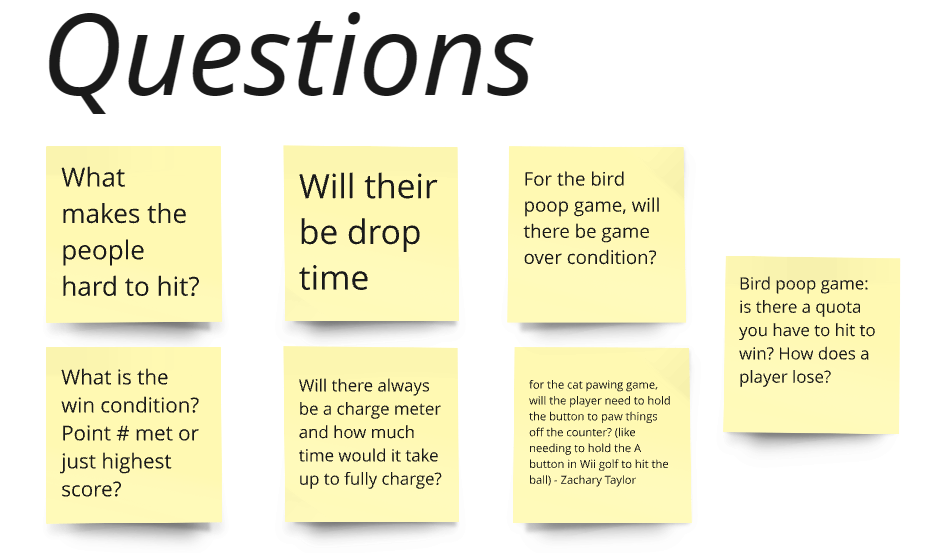
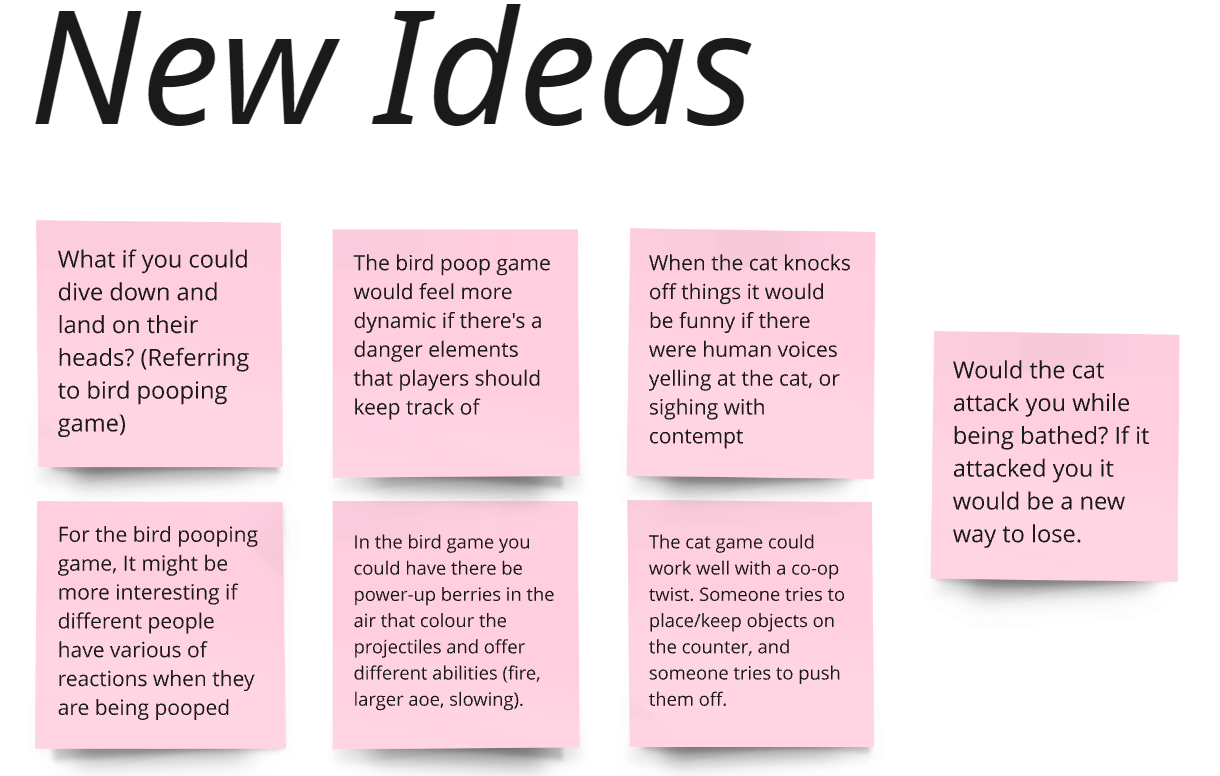
There appeared to be a lot of questions about the bird poop game, as well as several ideas students came up with for it.
The cat washing game did not receive as much feedback in any of the sections and our peers seemed to show more interest in the first 2 games.
With positive feedback towards the knocking over items game, as well as an interest towards the bird poop game, our team decided to explore both ideas.
We split the group in half(3 - 3), to create rapid prototypes of both game ideas (one prototype per person).
My Rapid Prototype
I created my prototype based on the cat game idea. I decided to create a paper prototype that could be physically interacted with. It’s quick to make and helps get a basic feel of gameplay without needing to code anything just yet.
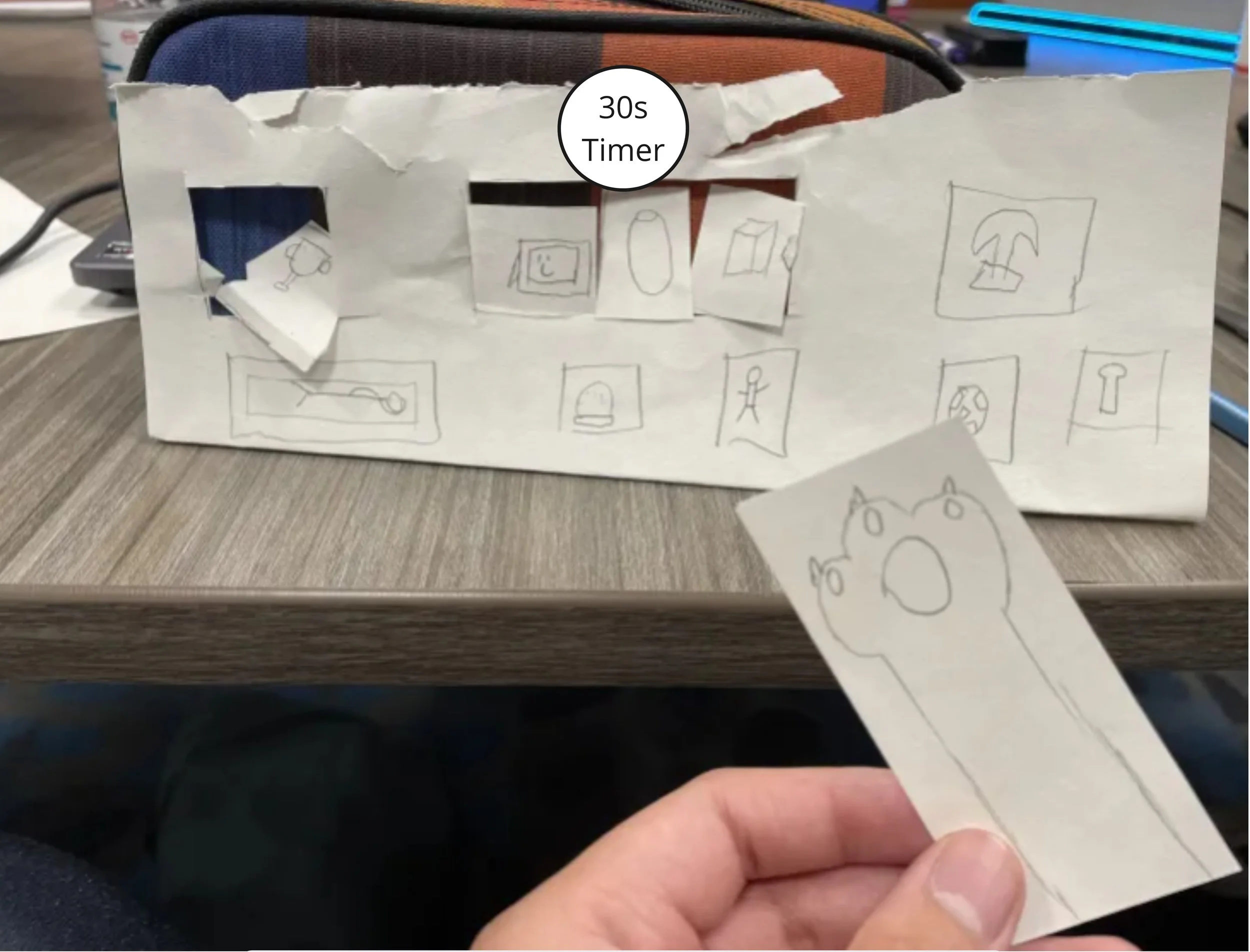
Description: A single player game where the player is a cat, that has to knock all the items off of the shelf. If all items are knocked off within the 30 seconds, the player wins. If they are unable to knock off all the items, then they lose.
Could have a Co-op(knock all the items off together) or a Competitive mode (knock off all the items on their own shelf before the other).
Intended controls on arcade cabinet: Joystick to move the paw. Button 1 or 2 to swipe at objects.
Summary of the other prototypes
Cat Prototypes
Prototype 1: PvE or PvP game. The first player plays as cat that has to knock over more than half the items off the counter by the timer ends. The second player(or NPC if there is no second player), has to prevent the cat from knocking over the items, and can pick up fallen items and place them back onto the counter. This player/NPC wins if more than half of the items are still on the counter by the timer ends.
Prototype 2: The player is a cat on a conveyor belt, and randomly generated boxes spawn left or right that move down from the top of the screen. The cat can charge up either the left paw(button 1) or the right paw(button 2) to destroy the box coming from the appropriate side.
Bird Prototypes
All prototypes: All 3 prototypes had very similar execution. The player is a bird that flies left and right on the top of the screen, and uses button 1 to drop poop onto the NPCs below.
All 3 win conditions were the same - poop on all human NPCs before the timer runs out.
Deciding on the Game
Peer Feedback
Our peers responded positively to all three cat prototypes, and gave lots of general feedback to them as well. They raised concerns to balancing the PvP cat prototype, and like the the shelf prototype having the potential for Co-op or Competitive modes.
The bird prototypes were presented after the cat prototypes, which could contribute to its lack of feedback, but our peers weren’t as engaged with the bird poop concept as to the cat prototypes. One of the only pieces of feedback we got was the concern of the player learning how to play the game within the 30 seconds on a blind playthrough.
Considering our Audience…
Along with the feedback provided by our peers, we needed to consider the people that would play our game. Since this would be played inside our campus, at the Tim Horton’s, all types of people would have access to our game, including those with little experience with video games. Most people would likely be passing by or wanting to buy a coffee.
We thought that having a bird pooping on people’s heads wouldn’t be as appealing to the general audience as compared to playing as a cute cat knocking over items off a shelf. Therefore, while we thought the bird poop game would be funny to make and play, it doesn’t fit well with the target audience.
Considering our Roles…
Our team had strengths in art, design and writing throughout several members, but only one member was comfortable taking on a programming role. This means we wanted to make a simple to code game, which isn’t a major concern since we are making a 30 second long game.
Our Decision
After considering these things, we decided to create the cat knocking items off a shelf game. It allows our artists to create several assets to put on the shelf, and the mechanic is simple to program. The game would also be intuitive to play within the first second of gameplay, and the cat would appeal to a larger audience.
Game Design
Problem: Optimal Path
In one of our earliest prototypes of the game, we didn’t have the red lights, and only had the action of knocking over the items. This means players can always go to an adjacent item to knock over, making gameplay boring as there is nothing to challenge the player and 30 seconds being long enough to knock over the items even when players don’t use an optimal path.
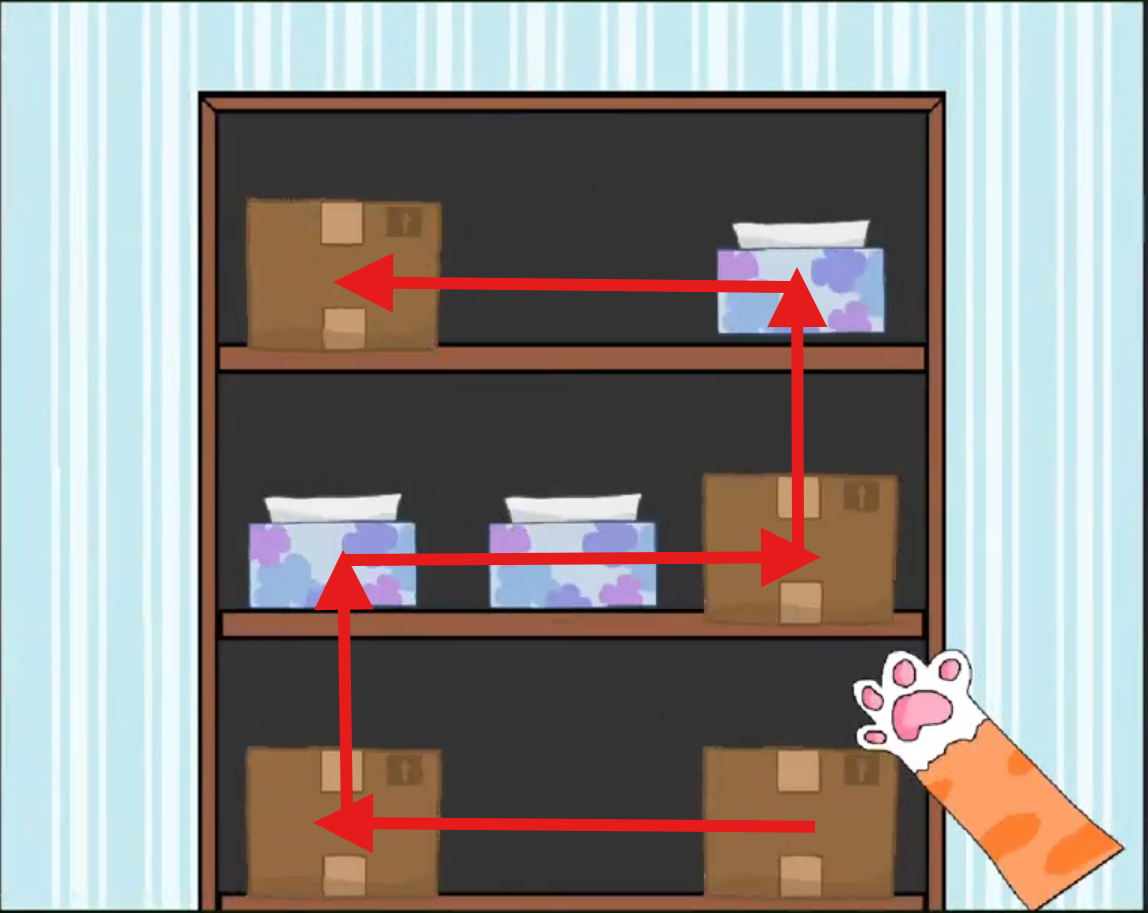
Old prototype that offers no resistance towards the player’s goal.
Solution: Add Challenge
We decided that adding a challenge should help keep players from immediately getting bored. The challenge should offer some resistance, but not be too difficult for players to overcome.
We decided to have a moving spotlight on each row moving at different speeds.
Feedback: Resetting The Paw
After testing with some peers, the spotlights did prevent players from taking a straightforward path to knock off the objects, but they appeared to respond negatively to the punishment the spotlights gave.
It wasn’t clear at first what they did, and testers noted that “it feels bad going back to that spot”, especially when you are going for further away objects.
It seemed that by resetting their position, it made players not know where their paw went and also made it feel like they lost progress.
Some Game Design testers said, it might feel better if it was a short duration stun, as opposed to resetting the paw’s position.
Feedback: Stunning the Paw
We implemented the stunning mechanic, and players reacted positively to the change. This mechanic, although punishing, most players seemed to think it was a fair challenge, and still had enough time to complete the goal even after getting hit a few times.
This also introduced an unintended, but welcome strategy, where in the moment, some players would intentionally get hit by a light, thinking it would be faster to wait out the timer, than attempt to take an awkward path to their next item.
We concluded that this version of the spotlight worked best, and we kept this mechanic in for the final version of the game.
Concluding Thoughts
This was this first team project where I took on the role as lead programmer. By having the largest programming role in the team, it helped me improve my technical skills in programming, and gave me the confidence to want to specialize in programming.
It also helped me try to get into the habit of commenting my code, and naming variables in a way that my team could immediately understand what they were used for. I also realized where commenting code could have helped speed up the process for my team members when they had to code things in.
This project went smoothly throughout most of the week. This was due to our friendly atmosphere and strong communication among team members. This shows how the efficiency of a team can improve by having a psychologically safe environment.
Overall, this project was a success, and I improved my programming ability and communication skills during the 5 days.